
1. 伪类选择器
根据元素的位置或状态来匹配子元素
- 结构伪类
与上下文选择器很相似
:nth-child()::first-child::last-child::nth-last-child()
- 状态伪类
常用于链接,表单
:hover: 鼠标悬停:enabled: 有效控件:disabled: 禁用控件:checked: 选中控件:required: 必选控件:focus: 焦点控件:not(): 过滤掉某些元素:empty(): 空
更多查询 MDN
2. 选择器权重
- 原子选择器: tag,class,id
- 原子选择器权重: tag(1),class(10),id(100)
可简单理解为: 标签是个位, class 是十位, id 是百位
3. 盒模型
- 一切皆”盒子”
- 盒子是页面中可见的”矩形区域”
- php.cn:
<html>,{outline:1px solid red}
- 五大属性
width: 宽height: 高padding: 内边距border: 边框margin: 外边距
- border
- 可见属性
- 可设置
width,style,color
- padding,margin
- 不可见属性
- 仅可设置:
width - 大多数内置元素都有默认
padding/margin - 建议全部重置为 0,以方便自定义布局
- width,height
- 默认不包含
padding,border
- box-sizing
box-sizing: 设置盒模型计算边界content-box: 默认值,仅包括内容区border-box: 推荐值,宽高扩展到可视边框
- 通用初始化
* {
  margin: 0;
  padding: 0;
  box-sizing: border-box;
}
结构伪类选择器
经典的列表示例:
<!DOCTYPE html>
<html lang="zh-CN">

<head>
  <meta charset="UTF-8" />
  <meta http-equiv="X-UA-Compatible" content="IE=edge" />
  <meta name="viewport" content="width=device-width, initial-scale=1.0" />
  <title>结构伪类选择器</title>
  <link rel="stylesheet" href="fake.css" />
</head>

<body>
  <ul class="list">
    <li class="item first">item1</li>
    <li class="item">item2</li>
    <li class="item">item3</li>
    <li class="item four">item4</li>
    <li class="item">item5</li>
    <li class="item">item6</li>
    <li class="item">item7</li>
    <li class="item">item8</li>
    <li class="item last">item9</li>
  </ul>
</body>

</html>
CSS部分,颜色为了避免重叠,颜色的代码后用横线-占位了,自行删除查看效果。
/**
 *
 * 结构伪类与上下文选择器很像
 * 1. 查询入口: 起点,可以是父级,也可是起始兄弟
 * 2. 仅限子元素或同级兄弟,尽量用 '>',只有一级用空格
 */

/* 任务1: 选择第1个,最后1个,任意1个,例如第4个 */
/* (1) 传统: class叠加 */
.list>.item.first {
  background-color: violet-;
}

.list>.item.last {
  background-color: violet-;
}

.list>.item.four {
  background-color: violet-;
}

/* (2) 伪类 */
/* :nth-child(an+b): 获取任意位置的元素 */
.list>.item:nth-child(1) {
  background-color: violet-;
}

.list>.item:nth-child(9) {
  background-color: violet-;
}

.list>.item:nth-child(4) {
  background-color: violet-;
}

/* 获取第1个和最后1个是高频操作,有快捷语法糖 */
/* :nth-child(1) === :first-child */
.list>.item:first-child {
  background-color: violet-;
}

/* :nth-child(9) === :last-child */
.list>.item:last-child {
  background-color: violet-;
}

/* ---------------------------- */

/* 任务2: 获取前3个 */
.list>.item:nth-child(-n + 3) {
  background-color: violet-;
}

/* 任务3: 获取导数第3个 */
.list>.item:nth-last-child(3) {
  background-color: violet-;
}

/* 任务3: 获取最后3个 */
.list>.item:nth-last-child(-n + 3) {
  background-color: violet-;
}

/* ============================== */

/* :nth-child(an+b) */

/**
 * :nth-child(an + b)
 * 1. a: 系数,[0,1,2,3,...]
 * 2. n: 参数, [0,1,2,3,...]
 * 3. b: 偏移量, 从0开始
 * 规则: 计算出来的索引,必须是有效的(从1开始)
 */

/* (1) a = 1  */
/* .list > .item:nth-child(1n + 0) {
  background-color: violet;
} */
/* 从第3个开始匹配到全部 */
.list>.item:nth-child(n + 3) {
  background-color: violet-;
}

/* (2) a = -1  反向,仅限前3个*/
.list>.item:nth-child(-n + 3) {
  background-color: violet-;
}

/* 再思考一个,如何要到最后3个,怎么办? */
.list>.item:nth-last-child(-n + 3) {
  background-color: violet-;
}

/* (3) a = 2 */
.list>.item:nth-child(2n) {
  background-color: violet-;
}

/* 2n = even 偶数 */
.list>.item:nth-child(even) {
  background-color: violet-;
}

/* 奇数: 2n+1, 2n-1也是一样 */
.list>.item:nth-child(2n + 1) {
  background-color: violet-;
}

/* 2n+1 = odd 奇数 */
.list>.item:nth-child(odd) {
  background-color: violet-;
}

/* (4) a >= 2 固定间隔,可用偏侈量进行微调,可正可负*/
.list>.item:nth-child(3n - 1) {
  background-color: violet;
}
状态伪类
经典表单示例: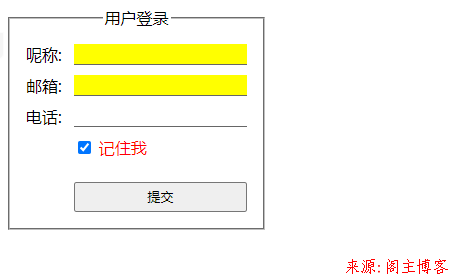
<!DOCTYPE html>
<html lang="zh-CN">
  <head>
    <meta charset="UTF-8" />
    <meta http-equiv="X-UA-Compatible" content="IE=edge" />
    <meta name="viewport" content="width=device-width, initial-scale=1.0" />
    <title>状态伪类</title>
    <link rel="stylesheet" href="form.css" />
    <link rel="stylesheet" href="fake-status.css" />
  </head>
  <body>
    <form action="">
      <fieldset class="login">
        <legend class="title">用户登录</legend>
        <label for="uname">呢称:</label>
        <input type="text" name="uname" autofocus required />
        <label for="email">邮箱:</label>
        <input type="email" name="email" required />
        <label for="tel">电话:</label>
        <input type="tel" name="tel" />
        <div class="remember">
          <input type="checkbox" name="remember" id="rem" />
          <label for="rem">记住我</label>
        </div>
        <button class="submit">提交</button>
      </fieldset>
    </form>
  </body>
</html>
form.css代码:
.login {
  display: inline-grid;
  grid: auto-flow / 3em 1fr;
  gap: 10px 0;
  padding: 1em;
}
.login input {
  border: none;
  border-bottom: thin solid #666;
}
.login .title {
  text-align: center;
}
.login .submit,
.login .remember {
  grid-column: 2;
  height: 2.2em;
}
fake-status.css代码:
/* 状态伪类: 根据当前元素的状态来设置 */

/* 1. 获取焦点时 */

.login :focus {
  outline: 1px solid red;
  border-bottom: none;
}

/* 2. 所有必填项 */
.login :required {
  background-color: yellow;
}

/* 3. 复选框选中时将标签的文本描红 */

.login :checked + label {
  color: red;
}

/* 4. 鼠标悬停 */

.login > .submit:hover {
  cursor: pointer;
  background-color: seagreen;
  color: white;
}
选择器权重
HTML代码部分:
<!DOCTYPE html>
<html lang="zh-CN">
  <head>
    <meta charset="UTF-8" />
    <meta http-equiv="X-UA-Compatible" content="IE=edge" />
    <meta name="viewport" content="width=device-width, initial-scale=1.0" />
    <title>选择器权重</title>
    <link rel="stylesheet" href="weight.css" />
  </head>
  <body>
    <!-- 元素 = 标签 + 属性(class,id )
    原子选择器: 标签, 类, ID
              tag, class, id  -->
    <h1 class="title" id="header">狂飙之后无好人</h1>
  </body>
</html>
weight.css代码:
/* h1 {
  color: green;
} */

/* 1,1,3: 极限了 */
html body h1#header.title {
  color: blue;
}

/* 0,0,1 */
h1 {
  color: yellowgreen !important;
}

/* 101: 1->id,0->class, 1->tag  */
h1#header {
  color: red;
}

/* 1->id,0->class,0->tag  */
/* 100 > 012 > 011 ...  */
#header {
  color: red;
}

/* 0,0,2 > 0,0,1 */
body h1 {
  color: green;
}

/* 1->class,2->tag , 012 > 011 */
body h1.title {
  color: green;
}

/* 1->class,1->tag , 011 > 010 */
h1.title {
  color: red;
}

/* 010 > 003 */
.title {
  color: green;
}

/* 0,0,1 */
/* 只要使当前权重大于 0,0,2就可以了 */
/* h1 {
  color: red;
} */

/* 三个tag, 权重 0,0, 3 */
/* 003 > 002 */
html body h1 {
  color: red;
}

/* 权重相同,依赖书写顺序 */

/* 只要提升权重,就可以摆脱对书写顺序的依赖 */
盒模型
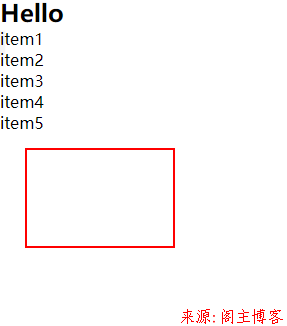
HTML、CSS代码示例:
<!DOCTYPE html>
<html lang="zh-CN">

<head>
  <meta charset="UTF-8" />
  <meta http-equiv="X-UA-Compatible" content="IE=edge" />
  <meta name="viewport" content="width=device-width, initial-scale=1.0" />
  <title>盒模型</title>
</head>

<body>
  <h2>Hello</h2>
  <ul>
    <li>item1</li>
    <li>item2</li>
    <li>item3</li>
    <li>item4</li>
    <li>item5</li>
  </ul>
  <div class="box"></div>
  <style>
    /* 样式重置/初始化 */
    * {
      margin: 0;
      padding: 0;
      box-sizing: border-box;
    }

    .box {
      width: 150px;
      height: 100px;

      /* 边框 */
      /* border-top-width: 2px;
        border-top-style: solid;
        border-top-color: red; */
      /* border-top: 2px solid red;
        border-right: 2px solid blue;
        border-bottom: 2px solid green;
        border-left: 2px solid violet; */
      border: 2px solid red;

      /* 内边距 */
      /* 完整语法: 四个值, 上, 右, 下, 左, 顺时针顺序 */
      padding: 5px 10px 15px 20px;
      /* 左===右=== 15px 三值语法*/
      padding: 5px 15px 10px;
      /* 左===右===10px   上===下===15px 双值语法*/
      padding: 15px 10px;
      /* 重点记忆三值与二值: 左右永远在第二个位置上 */
      padding: 10px;

      /* 外边距: 居中设置和多个元素间的间隙 */
      /* margin 与 padding 语法相同 */
      /* 也有四值,三值,双值,单值,与padding相同 */
      margin: 5px 10px 15px;
      margin: 15px 25px;

      /* 173.64 */
      /* border左右: 1.818+1.818 = 3.64px
        padding左右: 20px
        width: 150px  */

      /* 150 + 20 + 3.64 = 173.64 */

      /* 100平方, 公摊25% = 100-25=75平方 */

      /* box-sizing: content-box; */

      /* 将盒大小计算边界扩展到了边框(默认是内容区) */
      box-sizing: border-box;
    }
  </style>
</body>
</html>
本文地址:https://www.mainblog.cn/319.html
版权声明:本文为原创文章,版权归 阁主 所有,欢迎分享本文,转载请保留出处!
免责申明:有些内容源于网络,没能联系到作者。如侵犯到你的权益请告知,我们会尽快删除相关内容。
版权声明:本文为原创文章,版权归 阁主 所有,欢迎分享本文,转载请保留出处!
免责申明:有些内容源于网络,没能联系到作者。如侵犯到你的权益请告知,我们会尽快删除相关内容。
 黔ICP备19006353号-2
 贵公网安备 52052102000042号