
实现效果
下图为实战效果。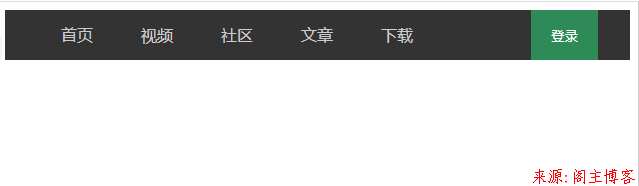
示例代码
<!DOCTYPE html>
<html lang="zh-CN">

<head>
  <meta charset="UTF-8" />
  <meta http-equiv="X-UA-Compatible" content="IE=edge" />
  <meta name="viewport" content="width=device-width, initial-scale=1.0" />
  <title>flex-导航</title>
</head>

<body>
  <header>
    <nav>
      <a href="">首页</a>
      <a href="">视频</a>
      <a href="">社区</a>
      <a href="">文章</a>
      <a href="">下载</a>
    </nav>

    <button>登录</button>
  </header>

  <style>
    header {
      height: 50px;
      background-color: #333;
      padding: 0 2em;
      display: flex;
      /* 二端对齐 */
      place-content: space-between;
    }

    nav {
      display: flex;
      /* 水平垂直居中 */
      text-align: center;
      line-height: 50px;
    }

    nav a {
      /* 项目: 行内块 inline-block */
      min-width: 5em;
      color: #ccc;
      text-decoration: none;
      flex: 1;
    }

    nav a:hover {
      color: white;
      background-color: seagreen;
      transition: 0.3s;
    }

    header button {
      border: none;
      width: 5em;
      background-color: seagreen;
      color: white;
    }

    header button:hover {
      cursor: pointer;
      background-color: coral;
      transition: 0.3s;
    }
  </style>
</body>

</html>
本文地址:https://www.mainblog.cn/322.html
版权声明:本文为原创文章,版权归 阁主 所有,欢迎分享本文,转载请保留出处!
免责申明:有些内容源于网络,没能联系到作者。如侵犯到你的权益请告知,我们会尽快删除相关内容。
版权声明:本文为原创文章,版权归 阁主 所有,欢迎分享本文,转载请保留出处!
免责申明:有些内容源于网络,没能联系到作者。如侵犯到你的权益请告知,我们会尽快删除相关内容。
 黔ICP备19006353号-2
 贵公网安备 52052102000042号